
POS Sys
Commercial and industrial surveillance from a Houston family company with 33 years in Texas.
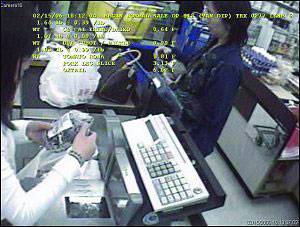 RETAIL OWNERS and MANAGERS! Ready to stop theft at your registers?
Here’s how…
CASH REGISTER INTERFACING
With cash register interfacing, you can extract the data from any of your cash registers that print on the receipt and overlay this data on a video picture of the checkout area. Most front-end commercial security cameras are positioned to monitor the cashier, the cash drawer, items purchased, and the customer. With all these elements recorded on tape, a store owner can review this scene and with one view verify if the check out was legitimate.
How an Interface Stops Theft
As an overt system, the cash register interface deters theft by raising the fear of being caught, along with the likelihood of developing a permanent record. This happens when clerks and customers know the interface is in place and how it works. Using hidden security cameras will not prevent the theft, but it will record the event for later prosecution.
Combine cash register interface with our high-tech Houston security cameras, and you have a powerful deterrent against loss. While the camera provides the visuals, the register interface system allows the recording of all transactions for later review. This gives you excellent coverage for such thefts as “sweet-hearting,” substitute scanning, no rings, short-changing, short rings, and pilfering.
Here’s an overview of common POS thefts:
Sweet-hearting:
This requires an accomplice or “sweetheart” who loads up expensive items for check out. The other perpetrator, a dishonest cashier, then either does not ring up certain items or rings up the items at a lower price than marked. This type of loss shows up later as inventory shrink.
Substitute Scanning:
This type of theft is carried out in stores that use scanning systems and may also involve sweet-hearting. The clerk fixes a scan tag of a low-value item on their palm. When an item is scanned, the palm tag is read instead of the actual item. Substitute scanning can also be carried out by an employee acting alone. The thief collects the correct value of the sale from the customer only to pull it from the register near the end of the shift. This type of theft, if viewed by a conventional camera system, may look just like an honest and above-board transaction. With the benefit of the text overlay, however, the manager can instantly detect the substitute scan.
No Rings:
In this act of theft, a clerk rings nothing up and makes change from an open cash drawer or from the top of the change drawer.
Short Changing:
In this example, the clerk cheats the customer by giving incorrect change.
Short Rings:
In this scenario, a clerk rings up an item at a price that is much lower than the actual value and either pockets the extra money immediately or pulls it from the register later. Usually the clerk does not complete the sale until the customer leaves. This is so that if the customer asks for a receipt or challenges the price, the clerk can then cancel the entry and ring up the correction.
Pilfering:
This refers to taking money directly from the register and leaving the register short. It usually occurs when more than one clerk uses the same cash drawer.
No Sales:
This is the most common exception. Some legitimate uses are making change or correcting change mistakes. Otherwise, the No Sale is always a questionable transaction. Towards the end of a shift, a clerk who has engaged in short rings or any kind of pilfering will have to remove the accumulated money for that shift. All No Sales should be exceptions, and all No Sales conducted in the last hour of a shift should be reviewed.
Voids:
The void is used after the customer is gone and a legitimate transaction is then voided. The money remains in the register until the thief chooses to removes it, either immediately after the void or towards the end of the shift.
Returns/Refunds:
In this type of theft, no actual exchange is being made yet cash is paid out. Items are pulled from inventory and fictitious refunds are given to the clerk or a sweetheart.
Cancels:
In cancels, a transaction is partially rung up. The clerk asks the customer for the money and if the customer does not ask for a receipt and leaves, the clerk cancels the sale. If the customer does request a receipt the clerk simply finishes the transaction and provides it.
Purchases or Payouts:
This usually occurs in small convenience stores when clerks receive papers, or other non-account deliveries. The clerk rings a payout and gives the vendor cash. A clerk who is in cahoots with the vendor will overpay and later collect or simply make the pay out for more and keep the difference.
Exception Reporting:
As described above, most of these methods of theft require the ringing up of substitute or low value items or opening the drawer without a normal sale. Such register transactions are called exceptions. A cash register interface can electronically watch for these questionable transactions and give a signal upon detection This signal can be in the form of an on-screen flag or alarm on the DVR for later search, or it can automatically turn on the cameras to monitor that register and the clerk. The most common type of exceptions monitored are No Sale, voids, returns, refunds, cancels, purchases, payouts, low-value sales, and high-value sales.
Pre-Exceptions or Post-Exceptions
There are two schools of thought on exception monitoring. The pre-exception technique is usually applied to low-cost situations and is most common. The exception can be programmed into the text inserter to trigger an alarm when the exception is detected.
The post-exception systems record all the data from all registers in an electronic file. They also store either the exceptions alone when using Pan/Tilt cameras, or else all the video data with fixed cameras and multiplexers from all the registers. At a later date, you can search the database for any type of exception. You can then go to the tape segment for that time period and watch the exception. Some sophisticated POS systems actually match specific data with the correct piece of video automatically.
How Cash Register Interfacing Works
The cash register business is unique in that is has no official industry standards. In fact, cash register companies go out of their way to make their hardware different. This can happen even within a company so that older equipment and accessories are not compatible with the newer models. This fundamental fact can needlessly complicate cash register interfacing. For example, one interface box can only connect to an extremely limited number of registers. Converter boxes are needed to translate from one format to another. Every model register has unique features that enhance the interface or cause major problems when dealing with loss prevention.
What separates commercial equipment from what you can buy online
The gap is not marketing. Consumer cameras are built to a price for a mild indoor climate and a homeowner who will replace them in a few years. Commercial hardware is built for continuous duty, wider temperature and humidity ranges, and sealed against the elements at the joints where cheap units fail first. On the Texas Gulf Coast that difference is measured in years of service life.
Sustained heat, high humidity, and salt air across the bay and coastal areas attack housings, cable glands and connectors relentlessly. Storm season adds wind loading that residential mounts were never engineered for. We routinely replace consumer-grade equipment that failed within two or three seasons, usually discovered at the exact moment someone needed the footage.
The other difference is the recorder. Consumer systems tie you to a manufacturer's cloud account, often with a subscription and a storage cap, and frequently with no clean way to export a clip that a police department or an insurer will accept. Commercial recorders keep the footage on your premises, under your control, exportable in standard formats, with retention you set rather than rent.
None of this means the most expensive option is automatically right. It means the cheapest option is frequently not cheap at all once you count the replacement, the lost coverage, and the incident it failed to capture.
Why Houston businesses choose Texas Surveillance
We have been a family-operated Texas company since 1993 — 33 years, Texas license B04080401. Over that time we have designed, installed and maintained commercial and industrial surveillance systems for the Houston Rockets, NRG Stadium, the George R. Brown Convention Center, the Houston Police Department, several municipal governments and fire departments, and many hundreds of warehouses, plants, dealerships, restaurants and storefronts across the region.
Two things set a commercial install apart from what you can buy in a box. The first is specification: cameras chosen and positioned against your actual sightlines, lighting and risk, rather than a package applied uniformly to every building. The second is service. Security contractors in this market appear and vanish constantly, and a system with nobody behind it becomes a liability the moment it fails. A large share of our work is maintaining and expanding systems we installed years — in some cases decades — ago.
What every system includes
Commercial-grade, weather-sealed hardware specified for Gulf Coast heat, humidity and storm season. Secure remote viewing from phone, tablet or desktop. Storage sized to the retention your risk actually requires rather than the minimum the recorder ships with. Full handover training so your people can find and export footage without calling us. And a free on-site survey before any of it — because a quote produced without walking the property is a guess.
Explore related solutions: IP cameras, 4K and megapixel systems, thermal imaging, mobile surveillance trailers, and our Texas service areas.
POS Sys — frequently asked questions
How much does a commercial security camera system cost?
Most Houston commercial installations run between $3,500 and $25,000 depending on camera count, resolution and analytics. A typical 8 to 16 camera system is roughly $6,000 to $14,000 installed. Every quote follows a free on-site survey.
How long does installation take?
Most commercial systems are installed in one to three days. Larger industrial or multi-building sites take longer. We work around your operating hours.
Can I view my cameras remotely?
Yes — every system includes secure remote viewing from phone, tablet or computer, with live view, playback and clip export.
How long is footage kept?
Standard retention is 30 days; we routinely configure 60, 90 days or a full year where insurance, compliance or legal requirements demand it.
Do you service what you install?
Yes. We have been family-operated in Houston for 33 years and a large share of our work is maintaining systems we installed years ago.
Are you licensed?
Yes — Texas license B04080401. Texas requires state licensing for security system installation; always ask for the number before hiring.
Let's find the blind spots in your property.
A 33-year Houston company walks your site, maps the coverage you actually need, and quotes it honestly. No pressure, no obligation.